Free wood grain texture maker
Make a repeatable wood-grain PNG tile for planks and props.
These tools run in your browser. Uploaded images stay on this device; no account is needed.
Download formats: PNG
Download this example · PNG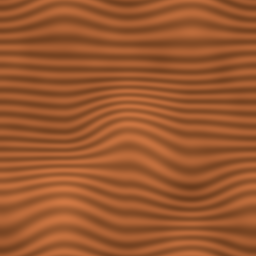
Preview
Set the controls, then generate a preview.
How to use it
This preset uses the wood style at 256 × 256, scale 4, and seed 42. Warm color bands follow one direction across a tile whose edges join.
- Generate the wood preset and inspect the repeated view.
- Adjust scale to change the spacing of the bands; change seed for another grain.
- Download the PNG and check its direction on your plank or prop.
Import the PNG as a repeating texture. Align its grain with the long axis of the surface and check the join at the intended scale.
Questions
- Can I turn the grain inside this tool?
- There is no direction control. Rotate the PNG or the texture coordinates where you use it.
- Does it add plank seams?
- No. It makes continuous grain, not separate boards or nail details. Add those shapes to your model or artwork.
Related guides and tools
- PNG
Free cobblestone-style texture maker
Make a repeatable gray stone PNG tile for game paths and floors.
Open tool - PNG
Free grass ground texture maker
Make a repeatable green PNG ground tile for games.
Open tool - PNG
Free water surface texture maker
Make a repeatable blue PNG tile for a game water surface.
Open tool