Build Custom Game Dev Tools With AI
Build custom game dev tools with AI. Your agent builds the exact tool your game needs inside Summer, shared with your team, and uses it too.

You can now build custom game dev tools with AI in Summer Engine. Your agent builds the exact tool your game needs, right inside Summer. A weapon balance table, a bug list, an asset tracker, a playtest board. Your team uses it, and your agent uses it too.
Every game ends up needing tools nobody sells. A sheet to balance weapons. A board that shows which monsters are finished. A page for last night's playtest. Big studios have whole teams that build these. Small teams make do with spreadsheets and chat threads. With Summer Apps, you describe the tool and your agent builds it in minutes. Need a change? Ask again.
Summer Engine is built so that any agent can do real work on your game, whichever agent you use. Summer Apps takes that one step further. The agent does not only change your game, it builds the tools your team works in, and then uses them with you.
What is a Summer App?
A Summer App is a small web app that lives in Summer Studio under Apps. Your agent writes it, Summer hosts it, and everyone in the workspace opens it from the same place. The Apps page puts it in one line: "Tools your team's agents built, shared with everyone in this workspace."
Three things make it more than a page your agent wrote:
- It is shared and live. When a teammate edits a row or moves a card, everyone with the app open sees it right away.
- It works on your real Summer data. An app can save shared data for your team, see your team assets, generate images, sounds, music, voices, 3D models and video, see your projects and your team, and read your game analytics. Each app lists what it can do in its menu.
- Your agent uses it too. The app's data is its API. Your agent can read and change the same records you see, even when nobody has the app open.
The Summer design kit is built in, with tables, charts, boards and forms, so apps look like part of Summer, in light and dark mode and on a phone.
How do you build custom game dev tools with AI?
You need a Summer account and an agent connected to the Summer Engine MCP. If your agent is not connected yet, one command sets it up. For Claude Code it is:
npx -y summer-engine@latest setup claude-code --yes
The list of supported agents has the command for Codex, Cursor and the others. Then:
- Open Summer Studio in your browser, so you can watch the app arrive.
- Ask your agent for the tool. Plain words are enough:
Build a Summer App for our team to balance our weapons. Each weapon has damage, fire rate, range and cost. Add a chart of damage per second and flag any weapon far above the rest. Keep the data in Summer for now.
- Watch it build. Your agent reads the Summer Apps guide, creates the app and publishes it. Your Studio tab switches to the new app and shows the files arriving.
- Use it with your team. Everyone in the workspace finds it under Apps. Click Keep so it stays.
You can also start in Studio. Open Apps and click Build a new app. Click Describe it to Summer, finish the request in the Studio chat and send it, and the chat builds the app for you. Or click Copy prompt and paste the prompt into your own agent.
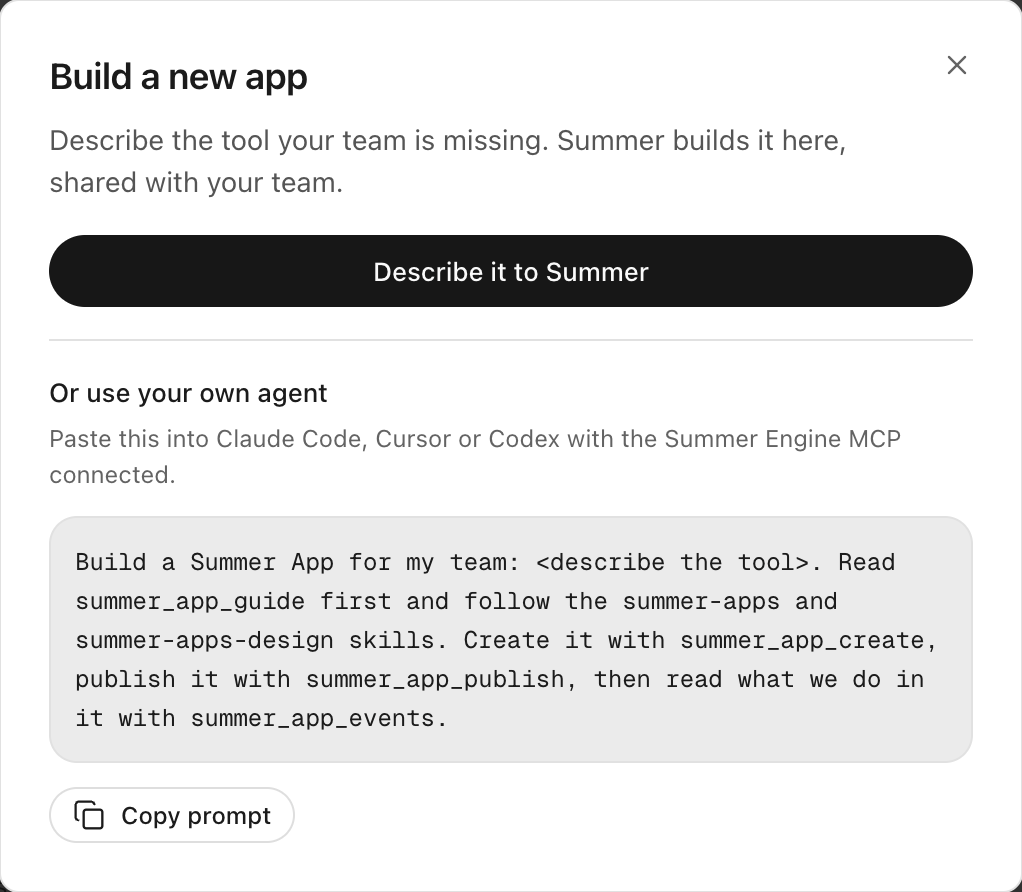
This is the prompt the button copies. Replace the part in angle brackets with your tool:
Build a Summer App for my team: <describe the tool>. Read summer_app_guide first and follow the summer-apps and summer-apps-design skills. Create it with summer_app_create, publish it with summer_app_publish, then read what we do in it with summer_app_events.
The Summer Apps overview and the first app guide walk through each step.
What can you build with Summer Apps?
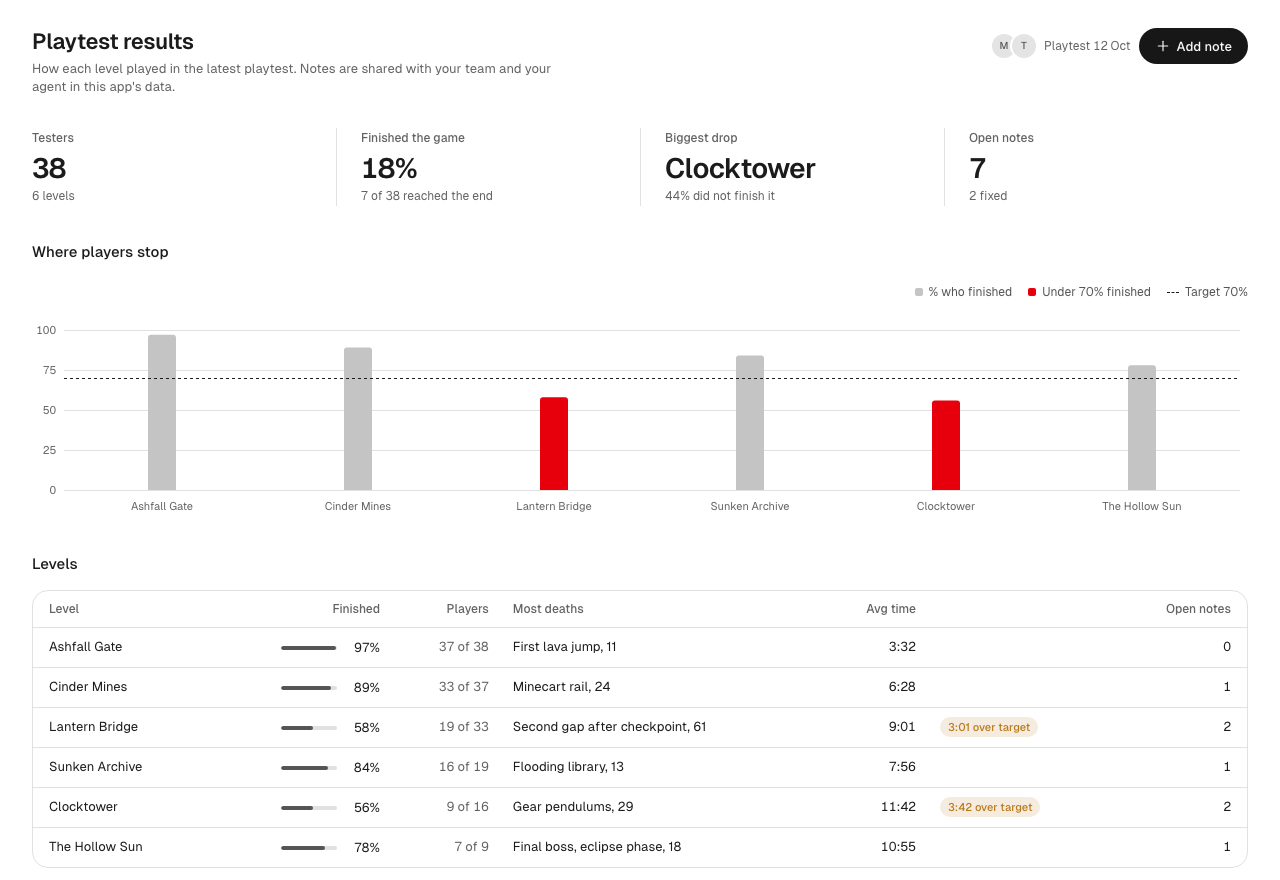
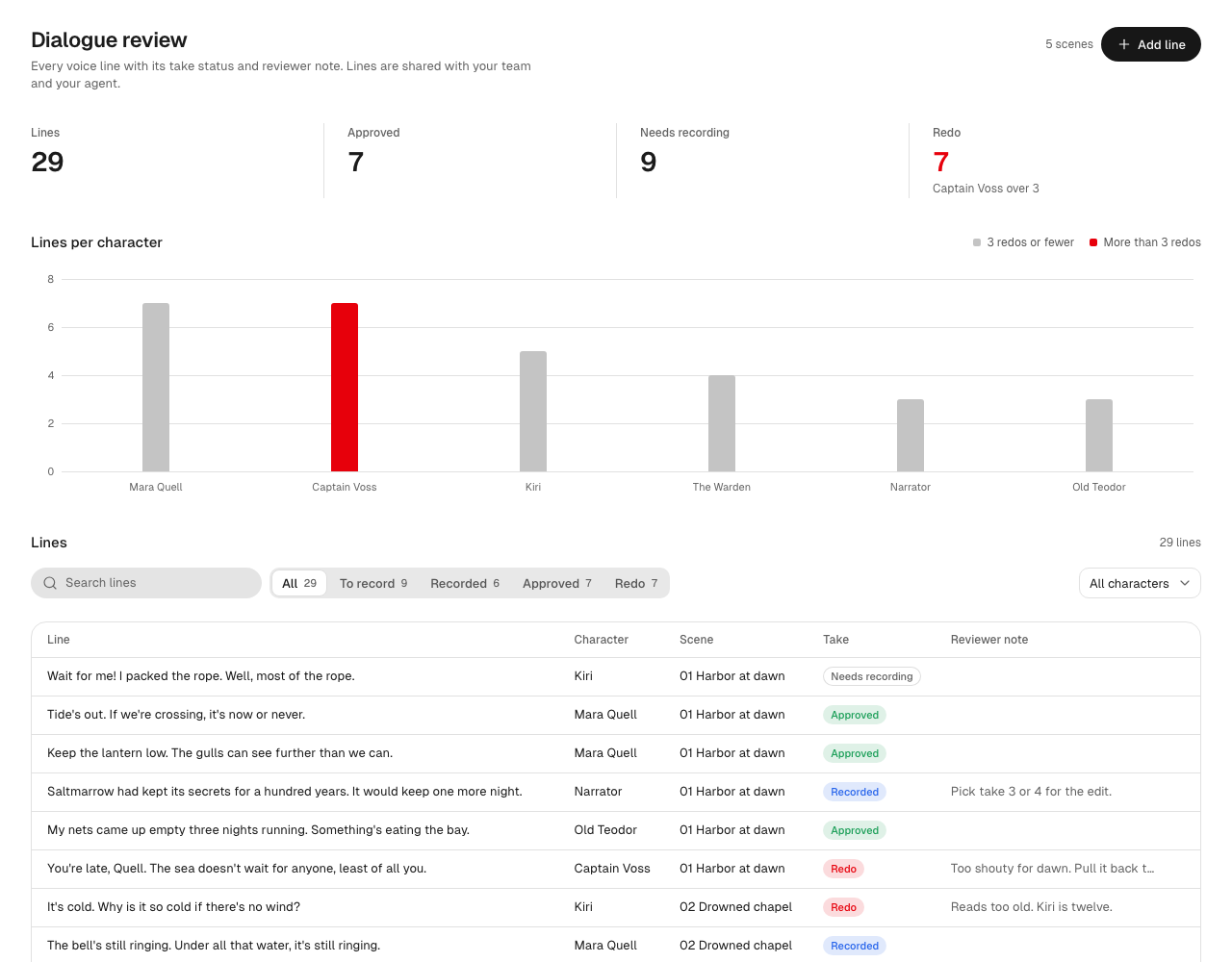
Anything a small web app can show: tables, charts, boards, forms, media players and editors. To test this, we asked fresh agents that had never seen Summer to build one tool each from the Summer Apps skills, design kit and SDK. These are two of the apps they built, shown with sample data.
A playtest board. How many testers finished each level, where they died, how long each level took, and tester notes your team can mark fixed.
A dialogue review sheet. Every voice line with its character, scene, take status and reviewer note, and a chart of lines per character that flags who needs the most redos.
The starter apps
Summer also ships four starter apps. Open Apps, find Starter apps and click Add to team.
- Pick one. Describe a sound and click Make versions. Three models make it, you listen and pick the versions you like, and your agent uses your picks. Each version uses your credits. Our post on game audio from your agent covers the sounds themselves.
- Asset tracker. Every asset as a card from Concept to Model to Animation to In engine, with owners and comments. Drag a card to move it, and your team sees it live.
- Live ops. Play sessions, launches, minutes played and store page views for your games on Summer Games over the last 28 days. It reads the same numbers as analytics for games made on Summer Engine and Grow in Summer Studio.
- Balance table. Damage, attack speed, DPS and cost for every item, with a chart of DPS per 100 gold. Its Load from game and Write to game buttons need the next Summer Engine update.
How does your agent work with an app?
An app is not a dead end for your agent. Once it exists, your agent can:
- Read and change its data. "In our bug list, mark the double jump bug as fixed." The change shows for everyone with the app open.
- Use what you click. An app can declare its fields and buttons, so your agent can fill and press them while you have the app open.
- Run the app's own tools. An app can offer tools to agents, and your agent runs them inside the open app with your rights.
- Hear from you. Your agent can wait for what you do in the app, such as a pick, a note or feedback, and act on it.
Some buttons are always yours. When an app marks a button as critical, such as delete, publish, pay or send, only a person can press it, never the agent.
How do you change or keep an app?
Ask your agent again, or click Edit with agent on the app and tell the Studio chat what to change. It reads the current files, changes them and publishes a new version. Every version is kept: open Versions and click Make live to roll back.
New apps start in Scratch, so quick throwaway tools do not pile up. A scratch app nobody opens for 14 days is archived, and you can restore it for 30 more days. Click Keep on the ones your team uses, and pin the best to your sidebar.
What is not in Summer Apps yet?
- The engine side comes with the next Summer Engine update. Docking an app as a panel next to your scene, and apps that read or write your project's files, need that release. Until it is out, apps run in Summer Studio.
- Apps are for your team. Everyone in your workspace can open them. There are no public app links yet.
- No server inside an app. An app is HTML, CSS and JavaScript in its own sandbox. Its data lives in Summer's shared data store, not on a backend you run.
- No open internet by default. An app reaches outside sites only when a workspace admin allows that site.
- Size limits. An app can be up to 10 MB and 300 files.
Tell us what you build
We ship fast, and Summer Apps lets you shape your own Summer today. If a tool is missing, ask your agent to build it. Then tell us what you built and what you still need. When many teams build the same tool, we build it into Summer for everyone.
Next, we will show one app per kind of game people make most on Summer, starting with management games and RPGs. Our posts on store art from your agent and multiplayer show the rest of what your agent can do for your game.
Tell your agent "Install Summer Engine and let's make a game."
Frequently asked questions
- What is a Summer App?
A Summer App is a custom tool for your game that your AI agent builds inside Summer Studio, such as a weapon balance table, a bug list or an asset tracker. It shows under Apps in Studio, everyone in the workspace can use it, and your agent can read and change the same data you see.
- Which agents can build Summer Apps?
Any agent connected to the Summer Engine MCP, such as Claude Code, Codex or Cursor, and the chat in Summer Studio. In Studio, Apps > Build a new app > Describe it to Summer asks the Studio chat, and Copy prompt gives you a prompt to paste into your own agent.
- Do I need to write code to make an app?
No. You describe the tool in plain words and your agent writes it. To change it, ask your agent again, or click Edit with agent on the app and tell the Studio chat what to change. Every change is a new version, and you can make an older version live again.
- Who can see the apps I build?
Everyone in your team's Summer Studio workspace. There are no public app links yet.
- Can an app change my game files or dock in the engine?
Not yet. Docking an app next to your scene and apps that read or write your project's files come with the next Summer Engine update. Until then, apps run in Summer Studio on your team's data, assets, generation and analytics.
- Does using an app cost credits?
The Summer Apps tools your own agent uses are free. Building or changing an app in the Studio chat uses your credits, like any other Studio chat, and a build costs more than a normal chat message. When an app or your agent makes something in it, such as a sound or an image, it uses the credits of the person using the app.
Keep reading
All posts
How to Add Matchmaking to Your Game
Add matchmaking to your game in Summer Engine. Quick play, ranked queues, fixed teams and an Accept prompt, with the real prompts and a server per match.

How to Test Multiplayer on One Computer
Test multiplayer on one computer with Local Play in Summer Engine. Press Play to run your server plus one window per player. No account, no server.

Game Analytics and Events in Summer Engine
Game analytics for indie games, built in. Track game events with one line of GDScript and see page views, launches and play time with zero code.