Asset Store
Discover high-quality assets for your next game project, or create your own with AI.
Create AssetDiscover high-quality assets for your next game project, or create your own with AI.
Create Asset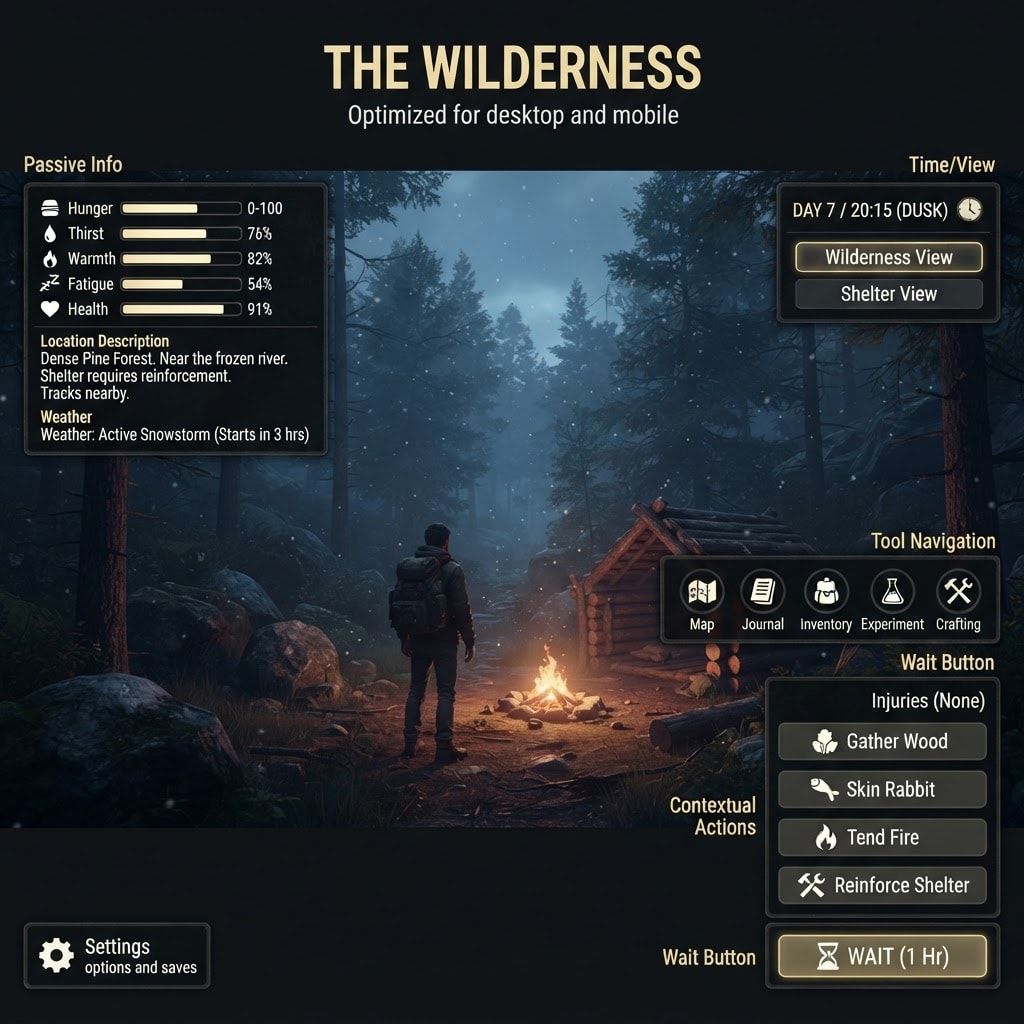
Made with Nano Banana 2 Lite · CC0 · 2 Sept 2026
Generated with prompt: Your task is to design a mock-up for a survival game. 16:9 optimized for both mobile and desktop. Below are the content that need to be in the UI, but the style and layout is up to you to suggest. INFO SECTIONS (passive display) 1. Vitals: five numeric stats, each 0-100 — Hunger, Thirst, Warmth, Fatigue, Health. 2. Injuries: a list of currently active injuries (empty most of the time). Each listed injury has a paired "Treat" action, which is only enabled when treatment is currently possible. 3. Weather: current storm status — one of: no concern, a storm forecast arriving in N days, or a storm currently active. 4. Day / time: the current day number and/or time of day. Time advancement is a core mechanic (see "Wait" below), so this should read as always-current, glanceable information. 5. Location description: one to two sentences of narrative text describing the player's current location and any notable state there (e.g. wildlife present). ACTION GROUPS 6. Contextual actions: buttons whose presence or enabled state depends on current game conditions — what's at this location, what location features are here, what wildlife is present, what equipment the player holds, whether an injury can be treated, whether an escape method is currently viable. This group's contents change constantly during play — sometimes empty, sometimes several buttons. Examples of the KINDS of actions that belong here: gathering materials at this location, scavenging a location feature, hunting or trapping wildlife, treating an injury, attempting to escape. This is a general category, not a fixed list — do not treat any single example as the complete set. 7. Wait: a single always-available control that advances time by one hour. Not conditional — always present and always enabled. 8. Tool navigation: a fixed set of five always-available entry points, each opening a dedicated screen — Map, Journal, Inventory, Experiment, Crafting. 9. View switch: a fixed set of two always-available controls that change what the main view is currently showing — the player's current wilderness location, their shelter, or construction status at this location — rather than opening a separate screen the way Tool Navigation does. 10. Settings: a single entry point to preferences/save management. The only true system-level control in this HUD — distinct from every action group above, which are all gameplay actions.
Creator
Trygve Brox
Sign in to join the conversation.
Sign in to comment🌍CC0
Use, share, and remix the model freely with no restrictions and no attribution needed.