Asset Store
Discover high-quality assets for your next game project, or create your own with AI.
Create AssetDiscover high-quality assets for your next game project, or create your own with AI.
Create Asset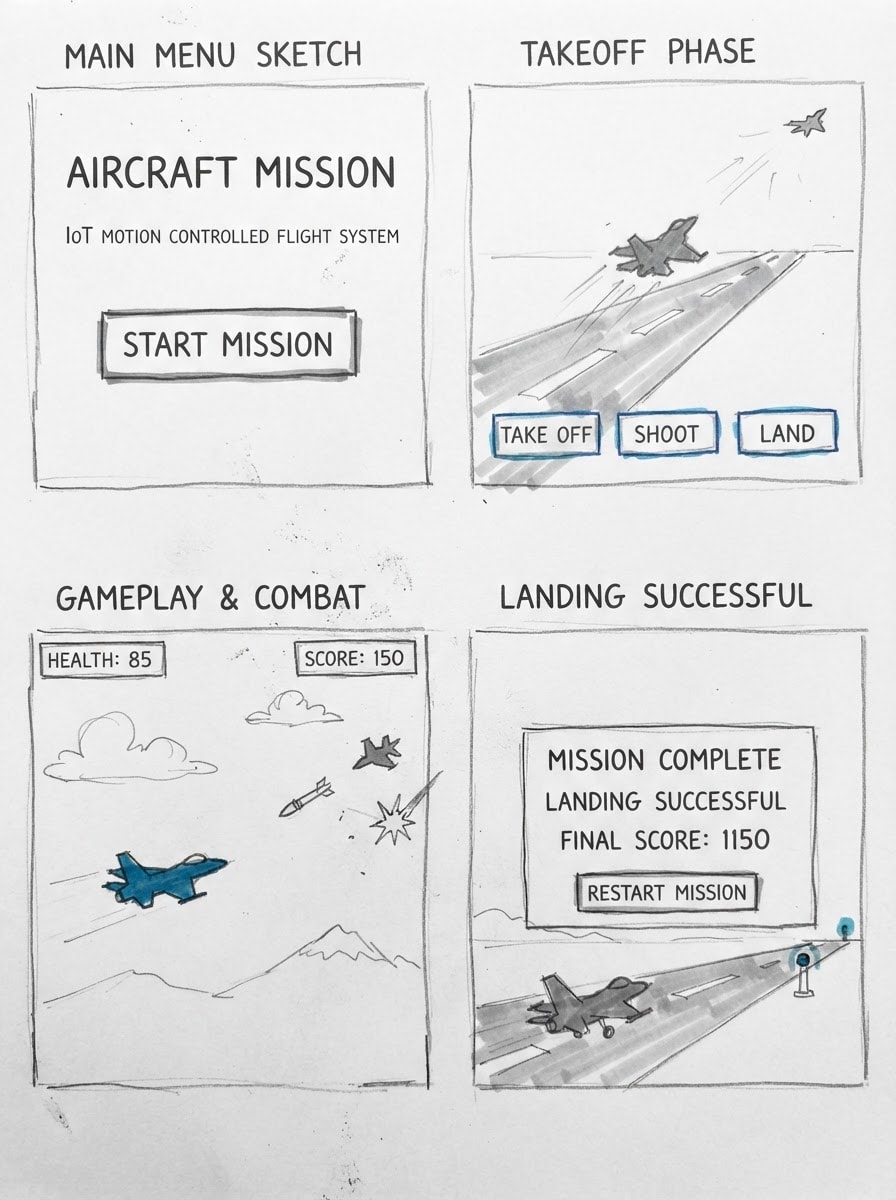
Made with Nano Banana 2 Lite · CC0 · 2 Oct 2026
Generated from: The player character of a scene from a small video game about: Create a complete polished 2D LANDSCAPE aviation action game titled: AIRCRAFT MISSION IoT MOTION CONTROLLED FLIGHT SYSTEM IMPORTANT: Build the entire game as a complete playable project, not a prototype or mockup. Use a realistic modern aviation style. Do NOT make it childish, cartoon-like, or use placeholder rectangles/lines for aircraft. SCREEN: - Landscape orientation - 16:9 aspect ratio - Target resolution 1280x720 - Desktop/laptop friendly - Keep all UI inside the screen - No text overlapping - No buttons outside the screen MAIN MENU: Show only: AIRCRAFT MISSION IoT MOTION CONTROLLED FLIGHT SYSTEM START MISSION Do not show gameplay HUD or gameplay buttons on the main menu. When START MISSION is pressed: - Hide the main menu - Start the actual mission - Place the player aircraft on the runway - Begin with a safe takeoff sequence PLAYER AIRCRAFT: Use a realistic modern fighter/aircraft image with transparent background if possible. Do NOT use: - rectangles - simple polygons - lines - tiny placeholder drawings - cartoon aircraft The aircraft must be clearly visible but not huge. Controls: - W / UP = move up - S / DOWN = move down - A / LEFT = move left - D / RIGHT = move right Movement must be smooth. Keep the aircraft inside the playable screen area. TAKEOFF: The mission starts with the aircraft on the runway. When TAKE OFF is pressed: - aircraft moves forward along runway - gradually accelerates - gradually rises from runway - transition smoothly into flight - then allow normal player movement Do not instantly teleport the aircraft into the sky. GAMEPLAY HUD: Top-left: HEALTH: 100 Directly underneath: FUEL: 100 Top-center: MISSION: DESTROY ENEMIES AND LAND SAFELY Top-right: SCORE: 0 Use a clean aviation/HUD-style font. Use subtle shadow/outline so text is readable. Never allow text to wrap, overlap, or leave the screen. BOTTOM CONTROLS: Place three compact buttons in one horizontal row: TAKE OFF SHOOT LAND They must: - fit completely inside the screen - be evenly spaced - not overlap each other - not cover the aircraft - remain readable SHOOTING: The SHOOT button must work. SPACE key must also shoot. When shooting: - launch a visible missile/projectile from the front of the aircraft - projectile travels forward - projectile must be clearly visible - projectile can hit enemy aircraft - successful hit destroys the enemy - show a small explosion effect - increase SCORE - play a shooting/explosion sound if audio is available Do not use an extremely thin line as the main projectile. ENEMY AIRCRAFT: Use realistic enemy aircraft images. Do NOT use rectangles, lines, or simple geometric placeholders. Enemies must: - appear from different directions - move through the sky - be visible and targetable - attack the player - be destroyable by missiles - have collision detection - create an explosion when destroyed IMPORTANT DIFFICULTY BALANCE: Do NOT spawn enemies immediately in large numbers. First 15–20 seconds: - no enemies or at most one distant enemy - safe introduction - allow player to complete takeoff Early section: - approximately one enemy at a time - enemies should be distant and relatively slow - limited attacks Middle section: - gradually introduce 1–2 enemies - slightly faster movement - occasional attacks Later section: - 2–3 enemies can appear - attacks become more frequent - difficulty increases gradually Never make the game unfair immediately after takeoff. Use spawn cooldowns and attack cooldowns. OBSTACLES: Create a long flight environment containing realistic environmental obstacles such as: - mountains - clouds - other aviation/environmental obstacles IMPORTANT CLOUD REQUIREMENT: Clouds must remain visually natural and attractive. Do not replace clouds with rectangles or simple blocks. Clouds are also obstacles: - aircraft can collide with clouds - collision should slightly reduce HEALTH and/or temporarily slow the aircraft - do not cause huge instant damage - use a short collision cooldown so health does not disappear instantly Mountains and other obstacles must also have reasonable collision detection. Do not make obstacles appear instantly at the beginning. Introduce them gradually. MISSION LENGTH: The game must NOT finish too quickly. Target total mission duration: approximately 8–12 minutes for a normal player. Fuel must NOT run out rapidly. FUEL SYSTEM: Start: FUEL: 100 Fuel should decrease gradually during actual flight. Do NOT rapidly drain fuel. The player should have enough fuel for the complete mission and return journey if they fly reasonably. Use gradual fuel consumption rather than a fast countdown. The mission should feel like a real journey: TAKEOFF → SAFE INTRODUCTION → FIRST ENEMY → OBSTACLE FLIGHT → COMBAT → MORE CHALLENGING FLIGHT → RETURN TO AIRPORT → FINAL APPROACH → LANDING Create enough distance, enemies, obstacles, and environmental variation to make the mission last around 8–12 minutes. MISSION PROGRESSION: PHASE 1 — TAKEOFF - runway - safe start - takeoff - no immediate enemy attack PHASE 2 — SAFE FLIGHT - aircraft flies through the environment - mountains/clouds appear - very limited danger - player learns movement PHASE 3 — FIRST COMBAT - first enemy appears - enemy is distant and manageable - player can shoot it - increase score after destruction PHASE 4 — OBSTACLE FLIGHT - more mountains and clouds - player must maneuver - gradual difficulty increase - occasional enemy aircraft PHASE 5 — MAIN COMBAT - multiple enemy aircraft - enemies attack gradually - shooting becomes important - score increases for destroyed enemies PHASE 6 — CHALLENGING FLIGHT - more environmental obstacles - somewhat faster enemies - still fair and playable - maintain reasonable fuel consumption PHASE 7 — RETURN JOURNEY - reduce combat gradually - guide the player back toward the airport - runway/airport should become visible - prepare for landing PHASE 8 — FINAL APPROACH When LAND is pressed: - switch to landing mode - aircraft should move toward the runway - gradually descend - reduce speed appropriately - align with runway - land smoothly LANDING: The LAND button must actually work. Successful landing: Show: MISSION COMPLETE LANDING SUCCESSFUL FINAL SCORE: [score] Then show: RESTART MISSION Do not show RESTART MISSION during normal gameplay. GAME OVER / FAILURE: Health starts at 100. If health reaches 0: Show: MISSION FAILED HEALTH DEPLETED Then: RESTART MISSION If fuel reaches 0: Show: MISSION FAILED OUT OF FUEL Then: RESTART MISSION Restart must reset: - player position - player flight state - health to 100 - fuel to 100 - score to 0 - enemies - missiles/projectiles - explosions - obstacles - landing state - mission progress - all timers/cooldowns HEALTH DAMAGE: Enemy attacks and collisions should reduce health gradually. Do not allow one collision to instantly end the mission unless it is a clearly defined major failure. Use reasonable damage and cooldowns. SCORE: Start: SCORE: 0 Increase score when enemy aircraft are destroyed. VISUAL STYLE: Realistic modern aviation. Professional military/aviation atmosphere. Natural sky. Realistic aircraft. Realistic enemy aircraft. Natural clouds. Mountains. Ocean/landscape. Airport and runway. Subtle shadows. Smooth movement. Smooth transitions. Good visual effects. Avoid: - childish cartoon graphics - generic geometric aircraft - placeholder rectangles - line aircraft - huge UI - cluttered HUD - oversized buttons - text going outside the screen AUDIO: If supported, add: - aircraft engine sound - takeoff sound - missile/shoot sound - explosion sound - landing sound - subtle ambient/environment sound Do not let sounds become annoying or excessively loud. CAMERA / WORLD: Create enough playable space for the mission to feel like a long flight journey. Do not make the entire game happen in one tiny screen area. Use smooth camera/world movement if needed while keeping the HUD fixed. IMPORTANT GAMEPLAY REQUIREMENTS: - Pl, full body, plain background. Drawn as a rough storyboard sketch: grey pencil and marker on white paper, one accent colour, loose flat shapes, no shading detail, no background clutter. Everything is original: never draw or resemble characters, places or logos from existing games, films or brands (no red-capped plumbers, no famous mascots), even when the idea names one. Keep the pictures honest: they promise what a small first version of this game, made in a game engine in a few days, can look like. Simple readable shapes, clear silhouettes, few flat materials, the in-game camera view. Never film stills, photoreal renders, AAA key art, detailed textures, cinematic lighting, or anything that looks like a big-studio game. No text, UI, HUD, logos or editor screens inside any image.
Creator
Harini
Sign in to join the conversation.
Sign in to comment🌍CC0
Use, share, and remix the model freely with no restrictions and no attribution needed.