Asset Store
Discover high-quality assets for your next game project, or create your own with AI.
Create AssetDiscover high-quality assets for your next game project, or create your own with AI.
Create Asset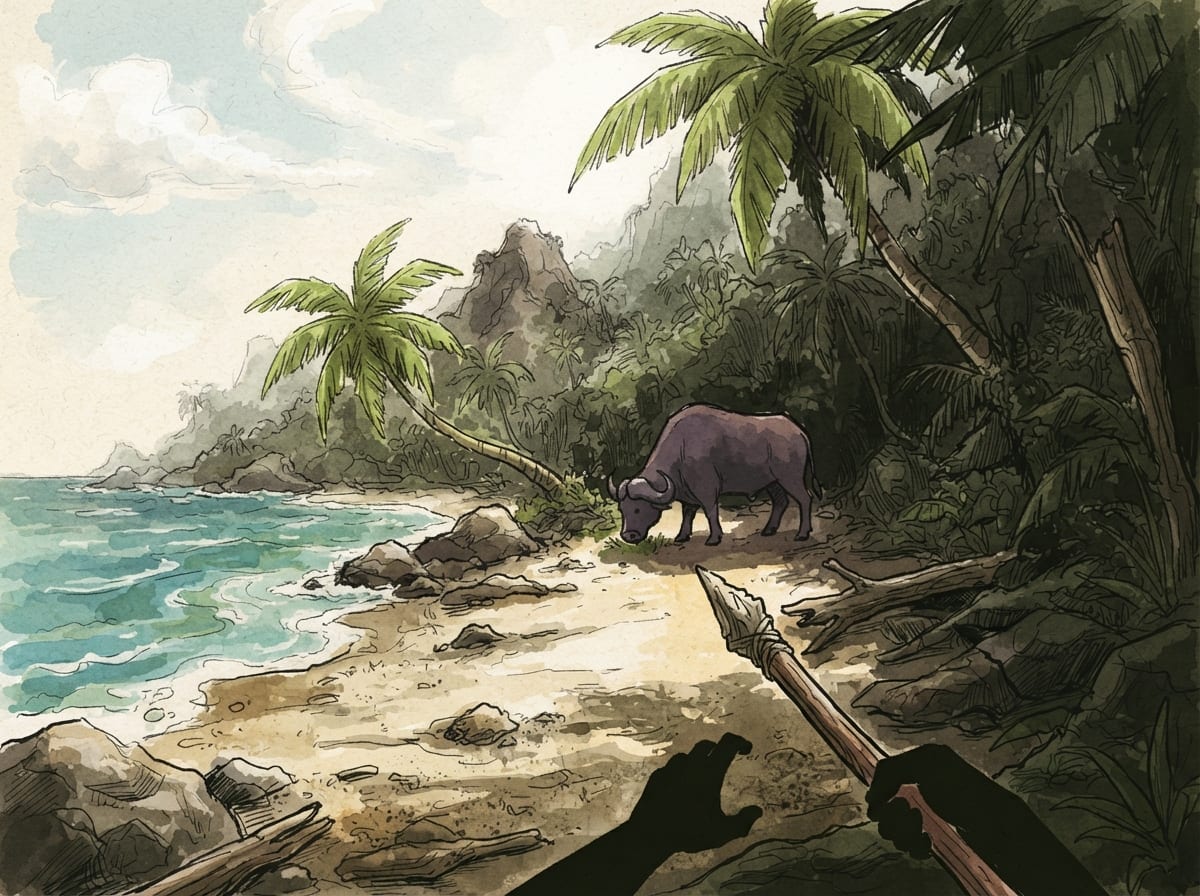
Made with Nano Banana 2 Lite · CC0 · 4 Oct 2026
Generated from: a scene from a small video game about: Create a playable **3D first-person survival game demo** called **“Skull Island: Survivor.”** The game should feel like a serious cinematic survival game, inspired by the atmosphere and survival gameplay of **ARK, Minecraft, The Forest, and MonsterVerse Skull Island**, with cinematic presentation inspired by **God of War (2018/Ragnarök)**. ## IMPORTANT ASSET RULE **DO NOT CREATE, DRAW, PROCEDURALLY GENERATE, OR REMAKE 3D models.** Use **real downloadable 3D models from online asset libraries** whenever possible. Use existing models for: * Human/player character * Cessna 208 Caravan airplane * San Diego environment * Courtroom * Military base/hangar * Beach * Jungle * Trees * Rocks * Animals * Monsters * Weapons * Backpack/equipment * Props Prefer **free/CC0 or otherwise legally usable assets**. Keep the original downloaded models instead of replacing them with primitive shapes. The goal is for the game to look like a real 3D game, not a simple prototype made from cubes. --- # STORY ## YEAR: 2016 The game takes place in **2016**, after the events of 2014. Skull Island is still intact and unexplored. The player character is **Miguel “Diago” Salazar**. Miguel has a criminal past and is given a chance to start over by joining a military scouting/pilot assignment. His brother previously served in the Air Force and died, but **DO NOT directly explain this in dialogue**. Instead, show it through: * Miguel's facial expression * A brief memorial * A photograph or military item * His reaction when entering the military facility Make the player understand what happened without having a character explain it. --- # OPENING CINEMATIC Start in **San Diego, California**. Make the opening cinematic feel like a real movie. Do NOT use flat text slides. Use: * Cinematic camera movement * Real 3D environments * Character animations * Lighting * Depth * Environmental sounds * Smooth camera transitions * Letterbox cinematic bars * Subtitles when characters speak * Background details ## Scene 1 — San Diego Show a realistic San Diego environment. The camera moves through the city and approaches a courthouse. Include a fictional **2016 news broadcast** somewhere in the background mentioning Miguel Salazar. The news should feel like part of the environment rather than a giant screen explaining the story. --- # COURTROOM Miguel is standing in court. Use a real downloadable courtroom model. The judge looks at Miguel. Dialogue: Judge: “Mr. Salazar, there is another way forward.” Miguel looks up. Miguel: “What kind of assignment?” The judge explains that Miguel can take a military scouting/pilot assignment. Do not make the dialogue overly long. Focus on cinematic acting and camera work. --- # MEMORIAL Cut to Miguel walking through a military facility. Show a small memorial/photo/medal connected to his brother. Miguel stops briefly. He looks at it. Do not have anyone say: “Your brother died.” The player should understand it naturally. Then Miguel continues walking. --- # MILITARY BASE Show Miguel preparing for the mission. Use real military/environment models. Show: * Military vehicles * Hangar * Equipment * Soldiers * Aircraft * Briefing area Then transition to the aircraft. --- # AIRCRAFT Use a **real downloadable Cessna 208 Caravan model**. Do not create a fake airplane from cubes. Show: Miguel enters the aircraft. Camera follows him. Interior cockpit shot. Engine starts. Aircraft takes off. Use realistic engine audio. Show San Diego disappearing below the aircraft. --- # STORM The aircraft begins flying toward Skull Island. The weather becomes worse. Add: * Dark clouds * Heavy rain * Lightning * Wind * Turbulence * Aircraft shaking * Radio interference * Instrument failures Miguel tries to control the aircraft. Radio: “Mayday... Mayday... this is—” Signal cuts out. Lightning flashes. The aircraft loses control. --- # CRASH Create a cinematic crash sequence. Do not make it overly graphic. Use: * Camera shake * Fire * Smoke * Rain * Aircraft debris * Loud impact * Black screen Then silence. --- # TRANSITION TO GAMEPLAY This is extremely important. The cinematic should transition **directly into gameplay**. No loading screen between the crash and gameplay if possible. The screen fades from black. The player wakes up on a **Skull Island beach**. The camera slowly becomes the player's first-person view. The player can move. ## FIRST GAMEPLAY OBJECTIVE Display: **SURVIVE** The player starts with almost nothing. --- # FIRST-PERSON CONTROLS Use: **W** = Forward **A** = Left **S** = Backward **D** = Right **Mouse** = Look around **Space** = Jump **Shift** = Sprint **E** = Interact / Pick up **F** = Backpack **1–5** = Hotbar Make mouse-look smooth. The player should feel like they are actually inside the environment. --- # SKULL ISLAND BEACH The first playable area should be a beautiful tropical beach. Use real downloadable assets for: * Ocean * Sand * Palm trees * Jungle * Rocks * Fallen trees * Plants * Driftwood * Mountains Make the island feel huge even though the demo area is limited. Use: * Atmospheric fog * Sunlight * Shadows * Ambient jungle sounds * Ocean sounds * Birds * Wind * Waves Do not make the environment look like a collection of simple blocks. --- # SURVIVAL The player must survive. Add survival statistics: **Health** **Hunger** **Thirst** **Stamina** **Sleep** Show them in the HUD. If the player does not eat, drink, or sleep, survival statistics should decrease. --- # GATHERING The player can gather: * Sticks * Stones * Leaves * Fiber * Food * Water Use real 3D models for resource objects. Press **E** to gather. Add satisfying pickup sounds and small UI notifications. Example: **+3 STICKS** --- # WATER The player eventually finds freshwater. The player can interact with it and drink. Show: **THIRST RESTORED** Do not make the interaction instant if possible. Add a short drinking animation. --- # FIRST CREATURE ENCOUNTER Near the freshwater, the player encounters a **Sker Buffalo**. Do not immediately attack the player. Make it behave like a real animal. It should: * Walk around * Drink * Look around * React to the player * Run away if approached aggressively Use a real downloadable animal model. --- # DEEPER INTO THE JUNGLE The player continues inland. The environment becomes: * Darker * Denser * More dangerous Add distant creature sounds. The player should feel like something is watching them. --- # SKULLCRAWLER ENCOUNTER Eventually the player encounters a **young Skullcrawler**. Use a real downloadable creature model. Do NOT create a homemade creature model. The creature attacks. The player must fight it. Add: * Creature animations * Roar * Footsteps * Attack animations * Hit effects * Player damage * Creature damage * Death animation Make the fight feel dangerous but manageable for the first encounter. --- # WEAPONS The player can eventually obtain basic weapons. Examples: * Wooden spear * Improvised weapon * Knife * Basic firearm if appropriate Use real downloadable weapon models. Do not create fake weapon geometry. Weapons should appear in the player's hands. --- # CRAFTING Add a crafting system. The player can craft: * Spear * Basic tools * Campfire * Water container * Simple shelter * Bandages * Basic clothing/armor Use real downloadable models for crafted objects whenever possible. --- # BACKPACK Press **F** to open the backpack. The backpack should look like an actual survival-game inventory. Categories: **Weapons** **Tools** **Water** **Food** **Resources** **Medical** **Clothing** **Other** Allow the player to drag/use items. --- # HOTBAR Put a five-slot hotbar on the screen. Keys: **1 2 3 4 5** Allow the player to switch between equipped items. --- # CHARACTER MENU Add a character tab. The player can equip: * Small armor pieces * Cloth * Bac, as an in-game screenshot in a hand-drawn ink and watercolour style. Palette: paper #f2e8cf, ink #283618, player tomato #bc4749, threat plum #6d597a, accent leaf #a7c957. Everything is original: never draw or resemble characters, places or logos from existing games, films or brands (no red-capped plumbers, no famous mascots), even when the idea names one. Keep the pictures honest: they promise what a small first version of this game, made in a game engine in a few days, can look like. Simple readable shapes, clear silhouettes, few flat materials, the in-game camera view. Never film stills, photoreal renders, AAA key art, detailed textures, cinematic lighting, or anything that looks like a big-studio game. No text, UI, HUD, logos or editor screens inside any image.
Creator
max wiillstone
Sign in to join the conversation.
Sign in to comment🌍CC0
Use, share, and remix the model freely with no restrictions and no attribution needed.