How to Make a 3D Game with AI in 2026
How to make a 3D game with AI in 2026. Browser tools cannot do real 3D. Here is what actually works, what each tool exports, and which one to pick.
By Summer Team
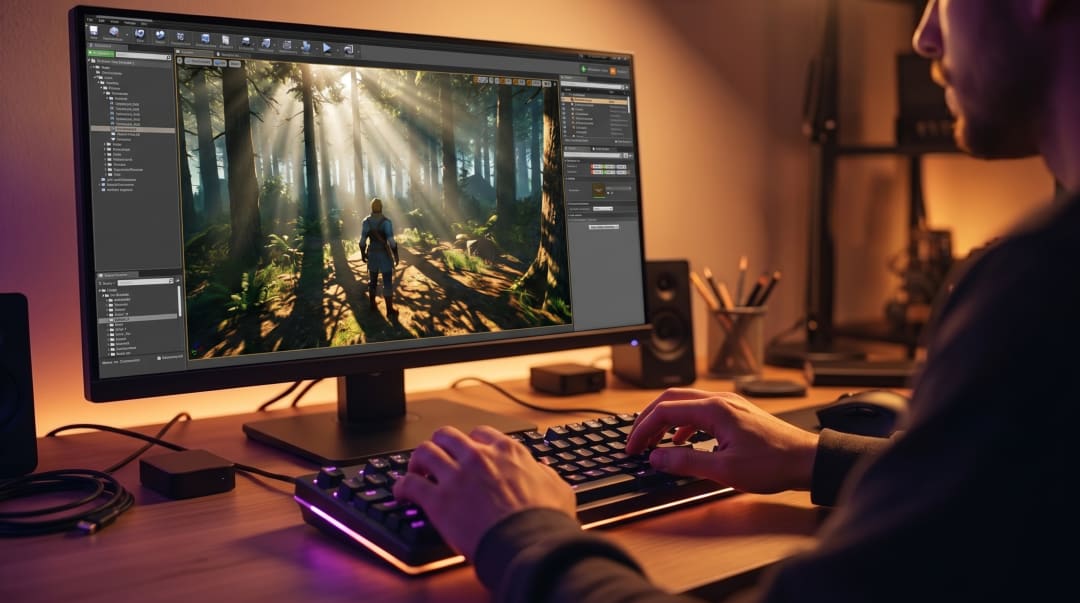
Most AI game tools you have seen on TikTok cannot make a real 3D game. They generate browser games. They run in HTML5. They do not export to Steam, and they break the moment your project gets bigger than a single scene.
This post covers what actually works for 3D in 2026. The two real workflows, what each one exports, and how to pick. If you want the full landscape across 2D and 3D, the parent guide is How to Make a Game with AI in 2026.
{/* IMAGE: Hero graphic showing a 3D scene being assembled from a chat prompt, with a character controller and lighting visible in the editor. Illustration, 1200x675. */}
Why Browser AI Tools Fail at 3D
The popular AI game makers (Rosebud, SEELE, Star) share one architecture: prompt in, web page out. The output is HTML, JavaScript, and WebGL running in a browser tab. That works fine for a 2D platformer or a top-down puzzle. It breaks down for real 3D for a few concrete reasons.
Rendering ceiling. WebGL 2 caps what you can do with shaders, lighting, and post-processing. There is no native renderer underneath, so realtime global illumination, volumetric fog, dynamic shadows on dozens of lights, and high-poly characters all hit a wall fast.
Asset pipeline. A 3D game needs meshes, textures, materials, animations, and rigs that all stay in sync. Browser tools either ignore the pipeline or fake it with placeholder primitives. There is no FBX import, no GLTF skeleton retargeting, no proper material graph.
No native export. You cannot list a browser game on Steam. You cannot publish to Switch, PlayStation, or Xbox. iOS and Android need a native wrapper at best. If you want to ship anywhere except a web page, browser tools are a dead end.
No persistent project. Browser tools regenerate the game from your prompt. There is no scene tree to edit, no inspector, no version control. The moment your idea outgrows a single prompt, you are stuck.
That is fine for a five-minute prototype. It is not how you ship a 3D game. The deeper breakdown of the engine vs maker distinction is in What Is an AI Game Engine.
The Two Real Workflows for 3D AI Games
If you want a 3D game that ships, there are exactly two paths in 2026.
Workflow 1: AI-Assisted (Unity or Unreal + Copilot)
You open Unity or Unreal, the same way a studio would, and use AI as a coding and asset helper. GitHub Copilot or Claude writes scripts. Midjourney or Stable Diffusion makes textures. Meshy or Tripo makes models. You import, wire, and tune everything yourself.
Strengths: full control over every system, mature renderers, every export target a console maker supports, every plugin and asset on the marketplace. This is how most professional studios ship today.
Limits: the AI is in a separate window from the engine. Every prompt starts from zero context. You explain your scene to the AI, paste the result back, fix the bugs, repeat. The engine learning curve is still there. Copilot does not teach you what a NavMesh is or where to put your render settings.
Best for: experienced devs who already know Unity or Unreal, or teams shipping a complex commercial title where engine depth matters more than speed.
Workflow 2: AI-Native (Summer Engine)
You describe the game in plain English, and the engine builds it directly. Scene tree, nodes, lights, character controllers, scripts. No copy-paste loop. Summer Engine is built on Godot 4 under the hood, so the renderer and physics are the same a human Godot dev would use, and it exports desktop builds for Windows and macOS.
A 3D session looks like this:
"Create a 3D third-person platformer with a double jump and coyote time."
Engine creates a scene with a CharacterBody3D, camera rig, ground plane, and movement script with the jump tuning baked in.
"Add a coin pickup the player can collect, with a chime sound and a counter UI."
Engine adds the coin scene, attaches an Area3D, wires the pickup signal, generates the chime, and adds a CanvasLayer with the counter.
"Replace the ground with a low-poly forest."
Engine generates the terrain, populates trees, sets fog and lighting to match.
Strengths: no context switching, full Godot project under the hood (you can open any generated .tscn or .gd file by hand), Steam and desktop export out of the box, free.
Limits: Godot is the renderer ceiling. That is plenty for stylized 3D, indie commercial titles, and most things a solo dev would ship, but it is not Unreal Nanite. Summer has no console export of its own. Console versions need platform holder approval and certification, usually through a licensed porting partner.
Best for: solo devs, small teams, anyone who has not yet shipped a 3D game and does not want the engine learning curve to be the bottleneck.
Comparison
| Tool | 3D capable | Asset pipeline | Steam export | Code ownership | Best for |
|---|---|---|---|---|---|
| Rosebud AI | No (HTML5) | None | No | None | Quick web prototypes |
| SEELE AI | Limited | None | No | None | Browser demos |
| Unity + Copilot | Yes | Full | Yes | C# project | Studios, complex titles |
| Unreal + Copilot | Yes | Full | Yes | C++/Blueprint | High-end visuals |
| Godot + Claude | Yes | Full | Yes | GDScript project | Devs comfortable with Godot |
| Summer Engine | Yes | Full (chat-driven) | Yes | Full Godot project | Solo devs shipping 3D fast |
{/* IMAGE: Side-by-side of an AI-assisted workflow (engine + chatbot in separate windows) vs an AI-native workflow (single editor with chat embedded). Diagram, 1200x600. */}
What You Can Build Right Now
The interesting question is not "is 3D possible," it is "what kind of 3D is realistic for a solo dev with AI in 2026."
Third-person 3D action. Character with melee or ranged combat, a few rooms, basic enemy AI. A weekend in an AI-native engine. The bottleneck is content, not tech.
First-person exploration. Walking sim, short narrative, atmospheric lighting. Easy. The renderer handles fog, point lights, and reflections. AI builds the controller and triggers.
Top-down isometric. ARPG, survival, base builder. The camera and controls are templated, so the work is the loop and the content. Tilemaps stay 2D, but the world is 3D.
Multiplayer. Two-to-eight player coop or PvP with networked state. Possible in an AI-native engine if you start from a multiplayer template. Not a starting project for a first-time dev.
Open-world AAA. Not realistic for one person, AI or not. Scope is the limit, not tooling. Even with AI, content load is months.
You can skip code entirely and still ship a real 3D game with the AI-native path. Read Make a Game Without Coding for the full breakdown of which tools actually let you ship without touching a script.
How to Start
The shortest path from idea to playable 3D in an AI-native engine looks like this.
-
Write the core loop in one sentence. "The player explores a haunted forest at night, lights torches, and runs from a stalker." A clear loop gives the AI a target. "I want a horror game" gives it nothing.
-
Open the engine, pick a 3D template. Third-person, first-person, or top-down. The template gives the AI context about cameras, controls, and what good defaults look like.
-
Prompt the first level. Type the loop sentence as your first message. The engine will create a playable scene with movement, lighting, and a placeholder environment.
Sample prompts you can paste:
- "Make a 3D first-person controller with mouse look, walk, sprint, and a flashlight on F."
- "Add a forest of low-poly trees scattered across the terrain with fog and moonlight."
- "Spawn a stalker enemy that wanders by default and chases the player when in line of sight within 15 meters."
-
Iterate in small steps. "Increase the flashlight cone." "Add footstep sounds on grass." "Make the stalker faster but with a longer wind-up." Small targeted prompts produce better results than vague rewrites.
-
Generate assets in context. Ask for the trees, the stalker model, the menu music inside the same conversation. The engine places them in the project as real assets, not loose files.
-
Export and ship. Build for Windows and macOS. Open Steamworks, upload your build, fill out the page. The full Steam process is in How to Publish a Game on Steam.
This is the same loop covered in How to Make a Game with AI in 2026, specialized for 3D.
When to Use Which Workflow
A short decision tree.
- You already know Unity or Unreal and have shipped before. Stay there. Add Copilot for speed. The engine cost is already paid.
- You are new to game dev and want to ship a 3D game. Use an AI-native engine. The engine learning curve is the actual bottleneck for most first-time devs, and AI-native removes most of it.
- You want to test a 3D idea in an hour. Use a browser tool, accept that the result is throwaway, and rebuild in a real engine if the idea has legs.
- You need photo-real visuals or Nanite-class geometry. Unreal. Nothing else matches it for that ceiling, and AI-assisted Unreal is real.
- You want full source code ownership and a path off the tool. AI-native built on an open engine. Summer Engine projects are standard Godot 4, openable in vanilla Godot any time.
The wrong answer is to spend three months learning Unity because someone on Reddit said it was the "real" way, then bounce off and ship nothing. The right answer is the workflow that gets your first 3D game finished.
Get Started
If you want to try the AI-native path, Summer Engine is free, builds 3D scenes through conversation, and exports Windows and macOS builds for Steam. Describe the game, watch the scene get built, ship the build.
The 3D AI tooling is good enough now that scope and design are the real limits, not the engine. Pick the workflow that matches where you already are and start.
Frequently asked questions
- Can browser AI tools make 3D games?
Not really. Browser AI tools generate HTML5 with simple WebGL at best. You cannot build a Skyrim-style or Hollow Knight-style 3D game in a browser tool and expect to ship it. For real 3D, you need an actual engine.
- What is the easiest way to make a 3D game with AI?
An AI-native engine where you describe what you want in plain English. Summer Engine builds 3D scenes, places lights, sets up character controllers, and writes scripts directly in the project. There is no copy-paste loop between the AI and the editor.
- Can I make a 3D game with AI without coding?
Yes. Summer Engine accepts plain English and produces a working 3D project, including scenes, character controllers, and exported builds. You can ship without writing code, and you can open any generated script later if you decide to learn.
- How long does it take to make a 3D game with AI?
A small 3D prototype with movement, a level, and one mechanic takes a weekend in an AI-native engine. A polished commercial 3D title still takes months because content and balance scale with scope. AI shortens iteration, not design.
- Can AI generate 3D models for my game?
Yes. Tools like Meshy, Tripo, and Rodin produce textured 3D meshes from a prompt or a reference image. Summer Engine pulls model generation into the editor so the result lands in your project as a real asset, not a downloaded file you need to import by hand.
- Can I make a 3D game with AI for Steam?
Yes, but only if your tool exports a native build. Browser tools cannot publish to Steam. AI-native engines and AI-assisted Unity, Unreal, and Godot workflows all produce builds that meet Steam's requirements. The full process is in the guide to publishing on Steam.
- Do AI 3D games look good?
It depends on the renderer underneath. AI-native engines built on Godot, Unity, or Unreal use the same lighting, shader, and physics pipeline a human dev would, so the ceiling matches what a small team can ship. Browser-generated 3D looks like browser-generated 3D.
- What is better for 3D, Unity with Copilot or an AI-native engine?
If you already know Unity well, Copilot adds speed without changing how you work. If you have not shipped a 3D game before, an AI-native engine removes the engine learning curve, which is usually the real bottleneck. Pick by where you already are.
Keep reading
All posts- Jun 6, 2026 · 9 min readHow to Make 3D Games with AI: A Practical Guide for 2026A step-by-step guide to making 3D games with AI in 2026. How to scope, prompt, and ship a real 3D project, with the prompts and order of operations that actually work.
- Jun 6, 2026 · 7 min readAI Enemy Generator for Games: What It Is and How to Use One (2026)What an AI enemy generator actually does, the three layers it should cover (sprite, stats, behavior), and how to build working enemies for your game by describing them in plain language.

- Jun 6, 2026 · 8 min readAI Horror Game Maker: How to Build a Horror Game by Describing It (2026)How to build a real horror game with AI: the five mechanics that actually make a game scary, which template to start from, and a step by step workflow inside Summer Engine where the AI is wired into the editor.
