How to Make an RPG Game (Beginner Guide)
Learn how to make your own RPG game from scratch. A practical beginner guide covering RPG types, core systems, tools, and step-by-step instructions to build your first RPG in 2026.
By Summer Team
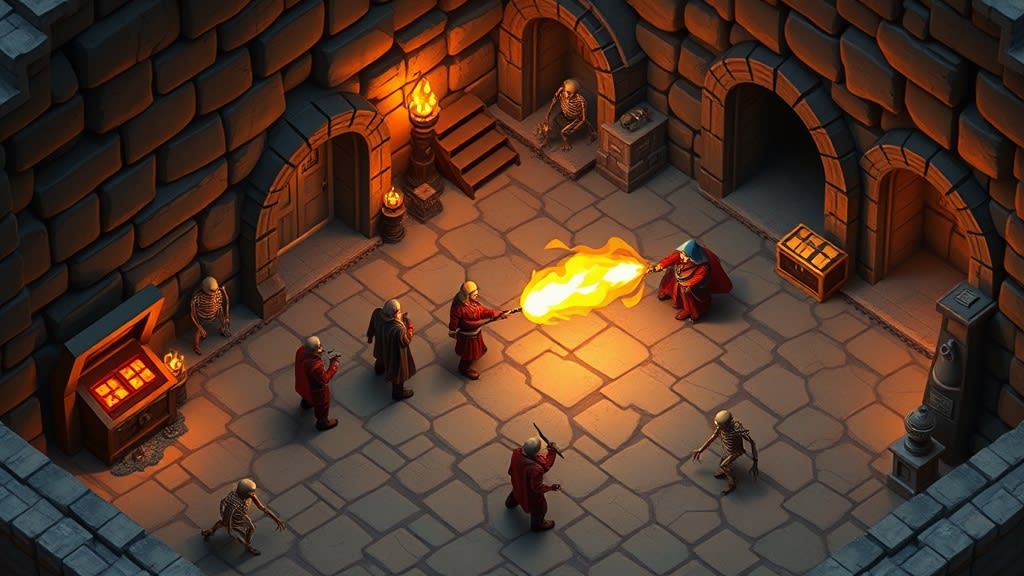
You have played hundreds of RPGs. Maybe thousands. You have leveled up characters, explored dungeons, made dialogue choices that kept you awake at night, and beaten bosses that took you dozens of tries.
At some point you thought: "I want to make one of these."
You can. RPGs are one of the most rewarding genres to build because they combine so many creative elements: storytelling, system design, world-building, and player choice. They are also one of the hardest genres for beginners, because there are so many moving parts.
This guide will help you cut through the complexity. You will learn which type of RPG to start with, which systems actually matter, and how to build your first playable RPG without getting overwhelmed.
What Kind of RPG Do You Want to Make?
"RPG" covers a massive range of games. Before you open any tool, figure out which flavor you are going for. Here are the four main types.
Action RPG -- Real-time combat with stats and loot. Think Diablo, Elden Ring, or Zelda. The player fights enemies in real-time while getting stronger through gear and levels. These are satisfying to play but require tight controls and responsive combat feel.
Turn-based RPG -- You and your enemies take turns. Think Final Fantasy, Pokemon, or Dragon Quest. Combat is strategic and methodical. These are great for beginners because you do not need to worry about real-time physics or animation timing.
Tactical RPG -- Grid-based, positioning matters. Think Fire Emblem, XCOM, or Final Fantasy Tactics. These add a spatial layer on top of turn-based combat. More complex to design, but deeply satisfying for strategy fans.
Story RPG -- Dialogue and choices are the core mechanic. Think Undertale, Disco Elysium, or Planescape: Torment. Combat might be minimal or absent entirely. The game lives or dies on its writing and branching paths.
Pick one. Not two. Not a hybrid. One type, one scope, one prototype. You can always expand later.
For your first RPG, turn-based is the most forgiving starting point. The pace is slow enough that you can focus on systems without worrying about frame-perfect combat.
The Core Systems of an RPG
Every RPG is built from a handful of interlocking systems. Here are the big five:
Stats -- Numbers that define your character. Health, attack, defense, speed. Stats create the math layer that makes the whole game work. Even a simple RPG needs some version of this.
Inventory -- Items the player collects and uses. Potions, weapons, armor, key items. An inventory system needs storage, equipping, and using or dropping items.
Dialogue -- Conversations with NPCs (non-player characters). This can range from simple text boxes to full branching dialogue trees with choices that affect the story.
Combat -- How the player fights. Turn-based menus, real-time swinging, card-based, grid-based. This is usually the system players spend the most time with.
Progression -- How the player gets stronger. Experience points, leveling up, learning new abilities, finding better gear. This is the hook that keeps players going.
Here is the important part: you do not need all five for your first RPG. Undertale shipped with minimal inventory. Some RPGs have no equipment at all. Disco Elysium barely has combat.
Pick two or three systems. Build those well. Add more later if you need them.
Start with One Room
This is the advice that separates people who finish their first game from people who give up after a month.
Do not design a 40-hour epic. Do not write a world bible. Do not plan out 8 party members with unique skill trees.
Build one room. One dungeon room with one enemy and one treasure chest. Make the player walk into the room, fight the enemy using your combat system, open the chest, and get an item.
If that one room is fun, you have something. Expand from there. Add a second room. Add a second enemy type. Add a simple boss fight.
If that one room is not fun, you have learned something valuable without wasting months. Tweak it, rebuild it, or try a different approach.
Every great RPG started as a tiny prototype. Undertale was a single-room demo before it became one of the most beloved RPGs of all time.
Tools for Making RPGs
You have three main paths, depending on your experience and how much control you want.
Summer Engine
You describe the RPG you want to make, and AI builds the systems for you. Tell it you want a turn-based battle system with three party members, and it generates the code, the UI, and the logic. You can then edit everything, add your own art, and customize it.
Best for: beginners who want to build a real, exportable game without writing code from scratch. Everything runs on the Godot engine under the hood, so you get a professional-quality project you actually own.
RPG Maker
The classic RPG tool. RPG Maker has been around for decades and is purpose-built for 2D RPGs. It comes with tile-based map editors, built-in combat systems, and a huge community of creators sharing assets and plugins.
Best for: 2D pixel-art RPGs in the JRPG style. If you want something that looks like a SNES-era Final Fantasy, RPG Maker gets you there fast. The trade-off is limited flexibility outside its built-in systems, and your game will look and feel like an RPG Maker game unless you put serious work into customization.
Godot or Unity
Full game engines with complete control over everything. You can build any type of RPG with any visual style. The cost is that you need to code everything yourself. Godot uses GDScript (similar to Python), Unity uses C#.
Best for: people who want to learn programming or already know how to code. More effort up front, but no ceiling on what you can build.
Step-by-Step: Building an RPG in Summer Engine
Here is what it looks like to go from zero to a playable RPG prototype.
1. Start a new project. Open Summer Engine and choose a template from the RPG category. You will find options like Turn-based RPG, Action RPG, JRPG, and Creature Collector.
2. Describe your game. Tell the AI what you want. For example:
"A turn-based RPG with a party of 3 characters exploring a dungeon. The warrior has high health and a shield bash ability. The mage has low health but powerful fire spells. The healer can restore HP and cure status effects. Enemies include slimes, skeletons, and a boss dragon."
3. The AI builds it. Summer Engine generates your battle system, character stats, abilities, enemy encounters, and a dungeon layout. You get a working prototype in minutes, not weeks.
4. Playtest and iterate. Open the project, walk around, fight some enemies. Does the combat feel too easy? Tell the AI to increase enemy damage. Want a new ability? Describe it and it gets added. This back-and-forth is where your game takes shape.
5. Make it yours. Add your own sprites, write your own dialogue, design your own levels. The AI gives you a foundation. You turn it into your game.
6. Export and share. When you are ready, export a Windows or macOS build for desktop or Steam. It is a real Godot project. You own it completely.
Common Beginner Mistakes
After watching thousands of people try to build their first RPG, these are the patterns that kill projects.
Too much story before gameplay. You spend weeks writing lore, character backstories, and a detailed plot outline. Then you open a game engine and realize you do not know how to make a text box appear on screen. Write story after you have a working prototype. Story is easy to add. Systems are not.
Too many systems at once. You want crafting, fishing, cooking, romance, housing, mounts, pets, and a card game minigame. Each system takes real time to build and balance. Start with two or three. Add more only when the core game is fun.
Too many items and abilities. You design 200 weapons and 50 spells before your game has a single working enemy. You only need a handful of items to test your systems. Five weapons, three armor pieces, and a few consumables are enough for a prototype.
Perfectionism on art before gameplay. Custom pixel art for every tile, hand-drawn portraits for every NPC. Art is important, but it can come last. Use placeholder art (colored squares work fine) until your game is fun to play.
The pattern here is clear: build less, build it working, and expand from there.
Start Building Your RPG
You have the knowledge. You know which type of RPG to start with, which systems to focus on, and how to avoid the traps that catch most beginners.
The only step left is the one that matters: open a tool and start building.
If you want the fastest path from idea to playable RPG, check out the RPG templates in Summer Engine. There are ready-made starting points for the most popular RPG types:
- Action RPG -- real-time combat with loot and leveling
- Turn-based RPG -- classic party-based battles
- JRPG -- story-driven with anime-style presentation
- Creature Collector -- catch, train, and battle monsters
Pick one. Build one room. Make it fun. Then make it bigger.
Keep reading
All posts- Jun 6, 2026 · 8 min readHow to Make a Game for Beginners (Build Your First One Today)A hands-on, step-by-step guide for total beginners. Pick a tiny first game, build it one piece at a time with AI, test it after every step, and have something playable by tonight.

- Mar 28, 2026 · 8 min readHow to Make a Game in 2026 (Complete Beginner Guide)Learn how to make a game from scratch with zero experience. A step-by-step beginner guide covering tools, first projects, and publishing your game in 2026.
- Jun 6, 2026 · 10 min readBest Game Engine for Beginners (2026): 7 Engines ComparedThe best game engine for beginners depends on your game: Godot (free), GameMaker (2D), GDevelop (no code), Roblox Studio, Summer Engine (AI), Unity, and Unreal compared.
